

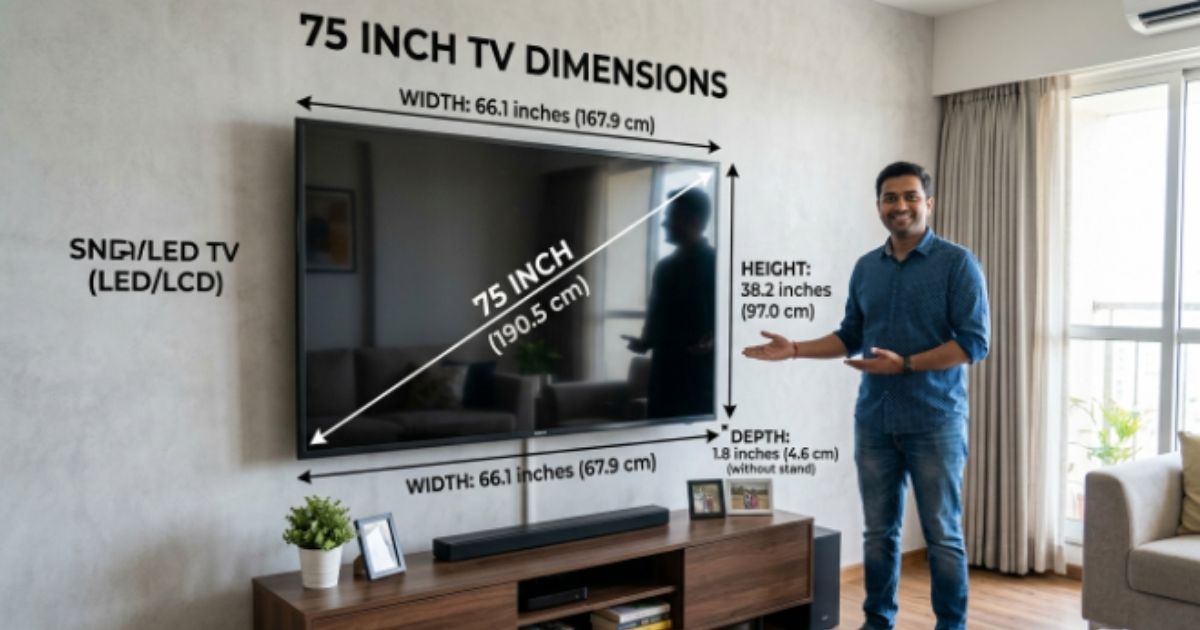
A 75-inch TV can transform your living room into a home theater, but its size involves more than the number on the box. Understanding the 75 inch TV dimensions helps you plan your wall, furniture, and viewing area before you buy. A typical 75-inch television measures about 65 to 67 inches wide and around 37 inches tall without its stand. However, the exact TV width and TV height vary by model, bezel design, and stand.
You’ll also need to consider TV depth, viewing distance, and available wall space. Whether you plan wall mounting or using a TV stand, knowing the actual measurements can prevent fitting problems and help you create a comfortable, balanced, and stylish entertainment setup.
What Are the Actual Dimensions of a 75-Inch TV?
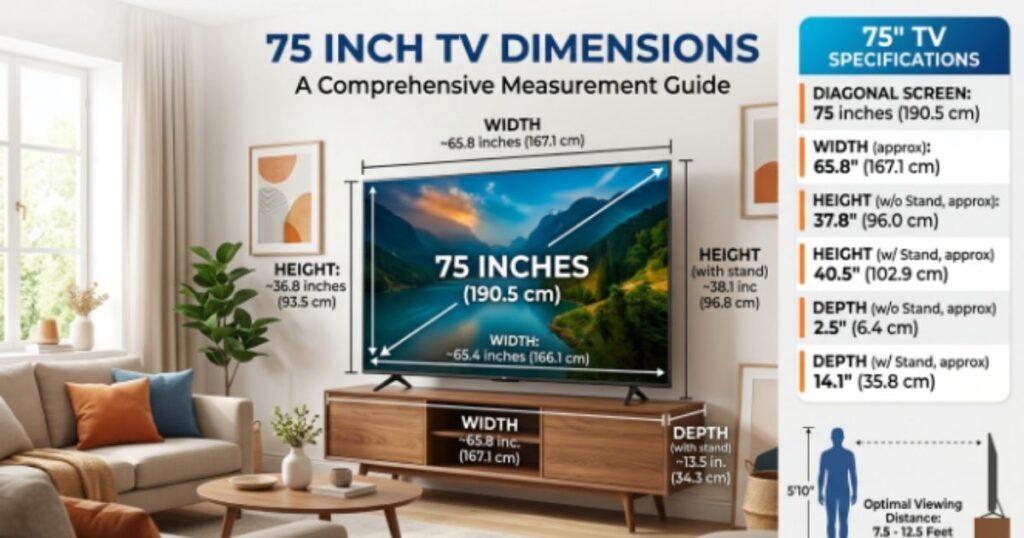
The first thing to understand about the dimensions of a 75 inch TV is what “75 inches” actually means. Manufacturers measure screen size diagonally from one corner to the opposite corner. They don’t measure the entire television from left to right. Because most modern televisions use a 16:9 aspect ratio, a 75-inch display has an approximate screen width of 65.4 inches and a screen height of 36.8 inches. Those numbers explain why a 75-inch screen can fit a wall even though its advertised size sounds enormous.
The actual dimensions of a 75 inch TV can shift slightly because manufacturers use different frames, panels, stands, and rear housings. Samsung’s published specifications illustrate this clearly. Its 75-inch QN85D measures about 65.76 inches wide and 37.72 inches high without the stand, while the Q6F measures about 65.67 inches wide and 37.71 inches high. Therefore, treat generic measurements as planning estimates rather than exact specifications. The model’s product page should always provide the final TV dimensions.
What Does “75 Inches” Mean on a TV?
A 75-inch television uses diagonal measurement to describe its display size. Imagine drawing a straight line from the bottom-left corner of the visible screen to the top-right corner. That line measures approximately 75 inches. The measurement doesn’t include the stand and doesn’t tell you the exact outer width.
This distinction matters when you’re buying furniture. A person searching how wide is a 75 inch TV usually needs the horizontal measurement rather than the diagonal size. For a typical 16:9 panel, the display itself is around 65.4 inches wide. The frame can add a small amount depending on the design. That’s why checking the manufacturer’s screen measurements and outer measurements remains the safest approach.
Typical 75 Inch TV Width, Height, and Depth
The typical 75 inch TV width falls near 65–67 inches. The 75 inch TV height generally sits around 37–38 inches without the stand. The 75 inch TV depth varies much more because manufacturers use different panel technologies and rear housings. Thin OLED and premium LED designs can sit remarkably close to the wall, while the rear section and stand can add substantial depth.
For example, Samsung lists one 75-inch Q70T at about 66.0 inches wide, 37.8 inches high without its stand, and 2.4 inches deep. With the stand attached, its height rises to roughly 41 inches and depth reaches about 12.7 inches. That example shows why 75 inch TV measurements should include the stand whenever you’re planning a cabinet or console.
75 Inch TV Dimensions With and Without the Stand
A TV’s body and its tabletop setup are two different footprints. 75 inch TV dimensions without stand are most useful when you’re planning wall mounting. By contrast, 75 inch TV dimensions with stand matter when the television sits on a console, media cabinet, or entertainment center.
Samsung’s specifications show the difference clearly. Its QN85D is about 65.76 inches wide and 37.72 inches tall without the stand. With the stand, it reaches about 40 inches tall and 10.8 inches deep. (So if you measure only the panel, your furniture plan could fall short. Always account for the feet, pedestal, or base.
75 Inch TV Dimensions in Feet, Inches & Centimeters
Knowing the 75 inch TV dimensions in inches makes furniture planning easier. Knowing the 75 inch TV dimensions in cm helps when you work with metric measurements or compare international product specifications. A typical 75-inch 16:9 screen measures around 65.4 inches wide by 36.8 inches high. That’s approximately 166.1 cm wide by 93.5 cm high. The 75 inch TV size in feet works out to about 5.45 feet wide and 3.07 feet high.
These conversions describe the approximate screen footprint. They don’t include every frame, stand, cable, or rear housing. For example, Samsung’s Q70A measures approximately 167.75 cm wide and 95.96 cm high without the stand, then reaches 102.59 cm high with it. That small difference becomes important when a TV sits beneath a shelf or inside a built-in cabinet.
75 Inch TV Dimensions in Inches
The most useful 75 inch TV dimensions in inches are the width and height. A typical display measures approximately 65.4 inches across and 36.8 inches from top to bottom. The outer frame may make those measurements slightly larger. The stand can increase both height and depth.
| Measurement | Approximate Size |
| Diagonal | 75 inches |
| Screen width | 65.4 inches |
| Screen height | 36.8 inches |
| Width | About 5.45 feet |
| Height | About 3.07 feet |
If your wall has 70 inches of usable width, a typical 75-inch display should fit horizontally. However, don’t stop there. Check outlets, trim, shelves, speakers, and other objects that could reduce the usable wall space.
75 Inch TV Dimensions in Centimeters
The 75 inch TV dimensions in centimeters are approximately 166.1 cm wide and 93.5 cm high for the 16:9 screen itself. These numbers come directly from the geometry of the screen rather than one particular brand. The physical TV can be slightly larger because of the frame.
Manufacturer specifications give more precise figures. Samsung’s 75-inch QN85D measures 167.02 cm wide and 95.82 cm high without its stand. That makes a useful point: generic 75 inch television dimensions help with early planning, while model-specific measurements should guide the final purchase.
How Big Is a 75 Inch TV in Feet?
The 75 inch TV dimensions in feet are roughly 5.45 feet wide and 3.07 feet high. That’s a useful mental picture for a typical U.S. living room. The screen can occupy a substantial portion of a media wall without necessarily overwhelming the room.
However, remember that the diagonal measurement remains 75 inches. Saying the TV is “over six feet” wide would be incorrect. Its width is closer to five and a half feet. That distinction matters when you compare it with a 65-inch or 85-inch display.
How Much Space Do You Need for a 75-Inch TV?
A 75-inch TV needs more than its physical footprint. You also need enough wall space, seating room, cable clearance, and furniture clearance to make the setup practical. A screen around 65–67 inches wide can look cramped when squeezed between two cabinets. Give the television enough breathing room to look intentional rather than wedged into the room.
The question how much space does a 75 inch TV need has two answers. Physically, you need enough width and height for the television itself. Visually, you need enough room size, seating distance, and open viewing area to enjoy the screen comfortably. A large TV can work beautifully in a moderate room when the seating position suits it. A much larger room can still feel wrong if the sofa sits too close.
Minimum Wall Space for a 75-Inch TV
For a typical 75-inch display, allow at least the TV’s actual width plus extra room for trim, cables, and visual balance. A 70-inch-wide wall section gives a reasonable starting point for many models. More space looks better when you plan shelves, speakers, artwork, or an entertainment center around the screen.
Don’t measure only the empty rectangle where the panel will sit. Check the outlet position, cable path, wall trim, windows, doors, and nearby furniture. A beautiful TV can become surprisingly awkward when a soundbar blocks a cabinet or a power cable has nowhere to go.
What Room Size Is Best for a 75-Inch TV?
There isn’t one magic 75 inch TV room size. The better approach considers room dimensions alongside viewing distance, seating position, and personal preference. A 75-inch television can suit many medium and large living rooms. The key is keeping the screen large enough to feel immersive without making the image dominate your entire visual field.
Think of the room like a small theater. The TV is the stage. Your sofa marks the audience area. If the audience sits too close, the stage can feel overwhelming. If it sits too far away, details lose impact. Good furniture placement creates a comfortable relationship between both.
Easy Tape-on-the-Wall Test
Before buying, use painter’s tape to mark approximately 65–67 inches of width and around 37–38 inches of height on your wall. Sit in your usual viewing position and look at the outlined area for several minutes. This simple test gives you a surprisingly accurate sense of the actual TV size.
You can even create two outlines for a 65-inch and 85-inch TV. That makes TV size comparison much easier than staring at numbers on a product page. The wall suddenly becomes a visual measuring tool.
What Is the Best Viewing Distance for a 75-Inch TV?
The ideal 75 inch TV viewing distance depends on the type of content, resolution, and how immersive you want the experience to feel. There isn’t one universal number. Sony currently lists about 55 inches as an approximate minimum viewing distance for a 75-inch 4K TV, while RTINGS gives a much farther distance of around 10 feet 2 inches for a 30-degree mixed-use field of view and about 7 feet 6 inches for its 40-degree cinema distance.
That difference isn’t a contradiction. These recommendations answer different questions. One focuses on when 4K pixels become difficult to distinguish. The other considers the screen’s field of view and immersion. For everyday U.S. living-room use, many viewers will find a seating position somewhere around 8–10 feet comfortable. Your own eyes, content, and preferences still matter.
Recommended 75 Inch TV Viewing Distance
A useful recommended viewing distance for a 75-inch TV depends on the experience you want. RTINGS places a 75-inch screen at about 10 feet 2 inches for 30-degree mixed usage, about 7 feet 6 inches for a 40-degree cinema viewing distance, and about 4 feet 7 inches for a highly immersive viewing position.
| Viewing Style | Approximate Distance |
| 30° mixed usage | 10 ft 2 in |
| 40° cinema | 7 ft 6 in |
| 62° highly immersive | 4 ft 7 in |
These figures provide useful reference points rather than rigid rules. If you watch sports from a recliner, your preferred distance may differ from someone who watches movies in a dark room.
75 Inch TV Viewing Distance for 4K Content
Modern 4K resolution makes large screens much easier to enjoy at relatively close distances. The higher pixel count creates greater pixel density, which reduces the chance of seeing individual pixels during normal viewing. Sony’s current guidance lists about 55 inches as an approximate viewing distance for a 75-inch 4K TV.
Older 1080p resolution displays generally benefit from more distance because individual pixels become easier to notice when you sit close. 8K resolution pushes pixel density even higher. Yet resolution isn’t the only factor that determines picture quality. Content quality, source compression, brightness, contrast, and your eyesight all influence what you actually see.
Does a 75-Inch TV Feel Too Big Up Close?
A large screen can feel overwhelming when it fills too much of your field of view. You may find yourself moving your eyes constantly to follow action at the edges. That’s exciting during a blockbuster. It can become tiring during a long sports game.
RTINGS uses field-of-view measurements to explain this balance. Its guidance places 30 degrees around a mixed-use baseline and 40 degrees around a more cinematic experience. In practical terms, your goal isn’t to find one “perfect” number. You’re looking for the distance that lets you see detail without sacrificing viewing comfort.
Will a 75-Inch TV Fit on Your TV Stand?
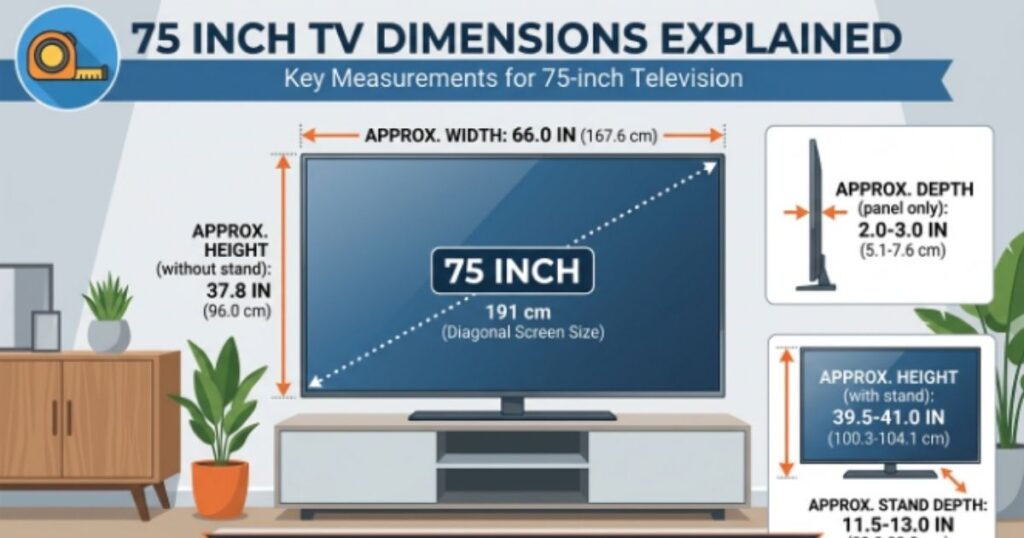
The correct 75 inch TV stand size depends on the TV’s actual width, base design, and weight. Don’t choose furniture based only on the “75-inch” label. Some 75-inch TVs use two widely spaced TV legs, while others use a central pedestal. Those designs create very different support requirements.
The safest approach is to compare the television’s manufacturer measurements with the furniture’s usable top surface. Check the TV stand width, TV stand depth, and rated weight capacity. Samsung’s current 75-inch Q6F, for example, lists a basic stand footprint about 49.2 inches wide and 11 inches deep, while the television itself is roughly 65.7 inches wide. That illustrates why the TV’s width alone doesn’t tell you exactly how much furniture you need.
What Size TV Stand Do You Need for a 75-Inch TV?
When choosing a TV stand for 75 inch TV, start with the actual base footprint. The stand should provide stable support for both feet or the center pedestal. A wider console can also improve the room’s visual balance, especially when you place speakers or décor beside the screen.
The recommended TV stand width often exceeds the TV’s width. A console around 70–80 inches wide can create a balanced look for many 75-inch setups. However, don’t treat that range as a safety requirement. The manufacturer’s instructions for the TV and stand take priority.
Can a 75-Inch TV Be Wider Than the TV Stand?
A TV can physically overhang furniture in some configurations. That doesn’t automatically mean the setup will fail. The important issue is whether the TV base sits securely on a suitable surface and whether the manufacturer’s requirements allow that arrangement.
Two-leg televisions need particular attention because the feet may sit near the outer edges. A narrow console could leave one or both feet unsupported. Before buying, measure the distance between the TV legs and compare it with the usable top of the furniture.
TV Stand Height and Depth for a 75-Inch TV
The right TV stand height depends on your sofa and eye level. Ideally, you want the center portion of the screen to sit at a comfortable height when you’re seated. A very tall cabinet can force you to look upward for hours, which isn’t ideal for relaxed viewing.
Depth matters too. The TV stand depth must accommodate the TV’s feet without leaving them partly unsupported. It should also leave room for ventilation and cables. If you use a soundbar, console, receiver, or streaming device, include those components in your room layout before selecting furniture.
How to Measure a 75-Inch TV Correctly
Measuring a television sounds easy until you realize that several different dimensions matter. The diagonal screen size tells you what class the TV belongs to. The horizontal width tells you whether it fits a cabinet. The height tells you whether it clears a shelf. The depth tells you whether the furniture can support it.
For the most accurate result, use the manufacturer’s listed TV measurements whenever possible. Samsung publishes separate dimensions with and without stands because the difference can be substantial. This approach removes guesswork from your TV installation.
How to Measure TV Screen Size
To measure the screen, place the tape diagonally from one corner of the visible display to the opposite corner. Don’t measure horizontally across the front. A 75-inch TV has a diagonal screen size of approximately 75 inches.
The frame doesn’t change the advertised screen class in the same way that overall furniture dimensions do. That’s why a television marketed as 75 inches can have a physical width of only about 66 inches.
How to Measure TV Width, Height, and Depth
Measure the outermost left and right edges to find the TV width. Then measure from the highest point to the lowest point for the TV height. Finally, measure from the front surface to the deepest rear point for the TV depth. Repeat the depth measurement with the stand attached if the TV will sit on furniture.
Don’t forget the base. A TV may be slim at the panel while its stand extends much farther backward. Samsung’s Q70T, for example, is only about 2.4 inches deep without its stand but around 12.7 inches deep with the stand.
Measurements to Take Before Buying
Before ordering a 75-inch TV, measure the wall, cabinet, doorway, hallway, and seating position. Record each measurement in the same unit to avoid confusion. If you live in the United States, inches and feet usually make furniture planning easiest.
The most important measurements are the TV’s outer width, outer height, depth, base footprint, packaged dimensions, and viewing distance. Once those numbers match your space, the purchase becomes much less of a guessing game.
75-Inch TV Wall Mount Dimensions & Installation Space
A 75 inch TV wall mount dimensions check involves more than finding a mount that says “75 inches.” You also need the television’s weight, VESA pattern, wall structure, and mounting position. Samsung lists a 400 × 400 mm VESA pattern on several 75-inch models, but the exact pattern can differ between TVs.
The wall must also provide enough room for cables and ventilation. Even an extremely slim wall-mounted TV shouldn’t be treated like a picture frame with no practical clearance. Leave enough room for power plugs, HDMI connectors, cable routing, and any rear-facing connections. Good cable management makes the installation cleaner while appropriate airflow helps avoid unnecessary heat buildup.
How Much Wall Space Does a Mounted 75-Inch TV Need?
A typical 75-inch panel needs roughly 66 inches of horizontal width and 37–38 inches of vertical height. Add practical clearance around those dimensions when planning shelves, cabinets, speakers, or decorative trim.
The exact mounting footprint depends on the model. Samsung’s QN85D, for example, measures about 167 cm wide and 96 cm high without its stand. Use that model-specific information when laying out your wall rather than relying entirely on generic 75 inch TV dimensions.
VESA Mounting and 75-Inch TVs
VESA mounting refers to the standardized hole pattern on the back of the television. A mount must match the TV’s VESA pattern and support its weight. Some 75-inch TVs use 400 × 400 mm patterns, although other configurations exist.
Never choose a mount solely because its packaging says “75-inch compatible.” Verify the exact VESA dimensions and weight rating for your television. A properly matched mount is a foundation for safe TV mounting, not merely an accessory.
How High Should You Mount a 75-Inch TV?
The best mounting height depends on your seated eye level. A common goal is to position the central part of the screen around your natural line of sight. The larger the television, the more important this becomes because a 75-inch panel extends considerably above and below its center.
Avoid placing the screen unnecessarily high above a fireplace simply because the wall provides space. A higher installation may look impressive from across the room while becoming uncomfortable during a two-hour movie. Good viewing comfort should beat visual drama.
Can One Person Mount a 75-Inch TV?
A 75-inch television is physically awkward even when its weight looks manageable on paper. Its wide frame creates leverage, making it difficult to grip securely during lifting. Some current Samsung 75-inch models weigh roughly 22–36 kg without their stands depending on the model.
For that reason, two-person handling is usually much more practical for large-screen installation. Professional help becomes even more sensible when the wall requires complex mounting, the TV is unusually heavy, or the installation involves difficult access.
75-Inch TV Dimensions Compared With Other TV Sizes
The easiest way to understand 75 inch TV size is to compare it with nearby sizes. A 65-inch screen is noticeably smaller, while an 85-inch display takes another major step upward. Because screen size is diagonal, the increase isn’t as simple as adding a few inches to the width.
A TV size chart makes these differences easier to visualize. The figures below represent approximate 16:9 screen dimensions. Actual televisions can vary slightly because frames and product designs differ.
| TV Size | Approx. Width | Approx. Height |
| 55 inches | 47.9 in | 27.0 in |
| 65 inches | 56.7 in | 31.9 in |
| 70 inches | 61.0 in | 34.3 in |
| 75 inches | 65.4 in | 36.8 in |
| 77 inches | 67.1 in | 37.8 in |
| 85 inches | 74.1 in | 41.7 in |
These approximate figures form a useful TV dimensions chart for early planning. The difference between 75 and 85 inches may sound like only 10 inches, yet the 85-inch screen is roughly 8.7 inches wider and 4.9 inches taller. That’s a substantial increase in physical presence.
65 vs 75 Inch TV Dimensions
The 65 vs 75 inch TV comparison comes down to more than screen size. A typical 65-inch screen measures about 56.7 inches wide and 31.9 inches high. A 75-inch screen measures about 65.4 inches wide and 36.8 inches high.
That means the 75-inch model adds roughly 8.7 inches of width and 4.9 inches of height. On a large wall, that difference can make the bigger screen feel much more cinematic. In a tighter room, the 65-inch option may provide a more restrained room layout.
75 vs 85 Inch TV Dimensions
The 75 vs 85 inch TV comparison shows an even bigger jump. An approximate 75-inch display is 65.4 inches wide and 36.8 inches high. An 85-inch display reaches about 74.1 inches wide and 41.7 inches high.
That extra size demands more wall space, a larger viewing area, and careful furniture planning. If the seating position already works well with 75 inches, moving to 85 inches isn’t automatically an upgrade. The larger panel should fit the room rather than simply fill it.
75 Inch TV Size Comparison Chart
A useful TV size comparison should include both physical dimensions and viewing distance. RTINGS places a 65-inch screen at about 8 feet 10 inches for its 30-degree mixed-use recommendation and a 75-inch screen at about 10 feet 2 inches.
| Screen Size | Approx. Width | Approx. Height | 30° Mixed-Use Distance |
| 65 inches | 56.7 in | 31.9 in | 8 ft 10 in |
| 70 inches | 61.0 in | 34.3 in | 9 ft 6 in |
| 75 inches | 65.4 in | 36.8 in | 10 ft 2 in |
| 85 inches | 74.1 in | 41.7 in | 11 ft 6 in |
Is a 75-Inch TV the Right Size for Your Room?
A 75-inch TV makes sense when your wall can accommodate roughly 66 inches of width and your seating position gives the screen enough breathing room. It works especially well for movies, sports, console gaming, and family viewing because the large image remains easy to see across a wider sofa.
However, size shouldn’t win every argument. If your room forces you to sit very close, a smaller television may provide better viewing comfort. If you have a spacious media room and sit far away, an 85-inch model might make more sense.
Common Problems When Buying a 75-Inch TV
Most problems start with one simple mistake: confusing the advertised screen size with the television’s actual footprint. People search what are the dimensions of a 75 inch TV, see the number “75,” and imagine a television that is 75 inches wide. It isn’t. A standard 16:9 75-inch screen is closer to 65.4 inches wide.
Other problems appear during delivery and installation. A television can fit perfectly on a wall but fail to pass through a narrow doorway in its packaging. The stand may also make the TV deeper than expected. A mount may fit the screen size but fail to match the VESA pattern. Checking these details before purchase can save a costly headache.
Mistake #1: Assuming 75 Inches Means 75 Inches Wide
The advertised 75-inch figure represents diagonal measurement, not horizontal width. A 75-inch 16:9 display is approximately 65.4 inches wide and 36.8 inches tall.
That distinction should guide every furniture decision. When comparing cabinets, shelves, and wall space, use the actual TV width and TV height, not the diagonal screen label.
Mistake #2: Forgetting the TV Stand
The stand can add several inches to the TV’s height and depth. Some designs use wide-set feet, while others use a central pedestal. Samsung’s specifications demonstrate how dramatically the base can change the usable footprint.
Before choosing furniture, check the TV stand size, base width, base depth, and weight capacity. A console that looks large enough may still fail to support the actual feet correctly.
Mistake #3: Ignoring Doorways and Hallways
A boxed 75-inch television is considerably larger than the bare screen. Packaging adds width, height, and depth to protect the panel during transportation. Samsung lists some 75-inch packages around 72 inches wide, depending on the model.
Measure your front door, interior doors, hallway turns, stairs, and elevator if applicable. A TV that fits the final wall still needs a clear path to reach it.
Mistake #4: Choosing the Wrong Wall Mount
Large televisions require a compatible mounting system. Check the TV’s VESA pattern, mounting screw requirements, and weight rating before purchasing a bracket.
For example, Samsung lists 400 × 400 mm VESA specifications on several 75-inch models. Don’t assume every 75-inch television uses the same pattern.
Mistake #5: Sitting Too Close or Too Far Away
A huge screen doesn’t automatically mean you should sit farther away. Modern 4K resolution supports relatively close viewing because its high pixel density makes individual pixels harder to distinguish.
At the same time, an overly close position can make the screen dominate your field of view. RTINGS recommends approximately 10 feet 2 inches for a 75-inch display at its 30-degree mixed-use reference point.
Use that as a starting point, then adjust based on comfort.
Mistake #6: Mounting the TV Too High
A television can look great above eye level while feeling uncomfortable during extended viewing. This problem becomes more noticeable with a 75-inch screen because the panel occupies a large vertical area.
Plan the seating position first. Then choose the mounting height. This approach produces a more natural TV installation than simply centering the television on the wall.
Final Thoughts
Understanding 75 inch TV dimensions turns a potentially confusing purchase into a much easier decision. The headline number describes the diagonal screen size. The measurements that matter for your home are the actual width, height, depth, base footprint, viewing distance, and mounting requirements. A typical 75-inch 16:9 screen is about 65.4 inches wide and 36.8 inches high. Actual models can vary, particularly once the stand enters the picture.
Before you buy, measure the wall, furniture, doorways, and seating position. Check the manufacturer’s overall dimensions instead of relying on the screen label alone. Then consider TV size and distance together. When the screen fits the room and your viewing position feels natural, a 75-inch large-screen TV can transform an ordinary living room into a remarkably immersive home theater. The numbers provide the map. Your room determines the destination.
FAQ’s About 75 Inch Tv Dimensions
What are the dimensions of a 75-inch TV?
A typical 75-inch TV is about 65–67 inches wide and 37–39 inches tall without the stand. Depth usually ranges from 2–4 inches.
What are the typical dimensions of a 75-inch smart TV?
Most 75-inch smart TVs measure roughly 66 × 38 inches without the stand, though exact measurements vary by brand and model.
How big is a 75-inch TV compared to a person?
A 75-inch TV is about 5.5 feet wide diagonally and around 3 feet tall. It can look quite large beside an average adult.
Is there a big difference between a 65 inch and a 75-inch TV?
Yes. A 75-inch TV is about 8.7 inches wider and 5 inches taller than a typical 65-inch TV, giving you a noticeably larger viewing area.
What are the actual dimensions of a 75-inch TV?
The actual dimensions of a 75-inch TV depend on the model, but a typical screen is around 65.4 inches wide × 36.8 inches tall before adding the stand or bezel.
People Read Also: Advertising FeedBuzzard: Complete Guide to Advertising, Strategies & ROI in 2026

My name is M.Adil, I am specialize in creating thoughtful digital content that informs, inspires, and engages readers worldwide. Every piece is written with care and originality.